Share on WhatsApp
A dedicated WhatsApp button, plus the phone’s share sheet and copy-link for any other app.
Shoppers send their cart to family and friends on WhatsApp. Whoever opens the link gets the same products, variants and quantities in their own cart, one tap from checkout.
Shoppers ask family before buying, or build a cart for someone else to pay. Without the right tool they send screenshots and the other person searches for every product again. Share Basket turns that conversation into an order.
A clean button sits in the cart above checkout, and on other pages while the cart has items.
A short link with a rich preview of your products inside WhatsApp or any chat app.
Opening the link adds the same products, variants and quantities to their cart at today’s prices and takes them to the cart.
A dedicated WhatsApp button, plus the phone’s share sheet and copy-link for any other app.
Your store name, product images and item count show inside the chat before the link is opened.
Inside the cart above checkout, floating, or automatic. Pick the side and color from the app.
Size, color and every other option come across exactly as the shopper chose them.
Links carry no prices: they come from your store when opened, and sold-out items are skipped.
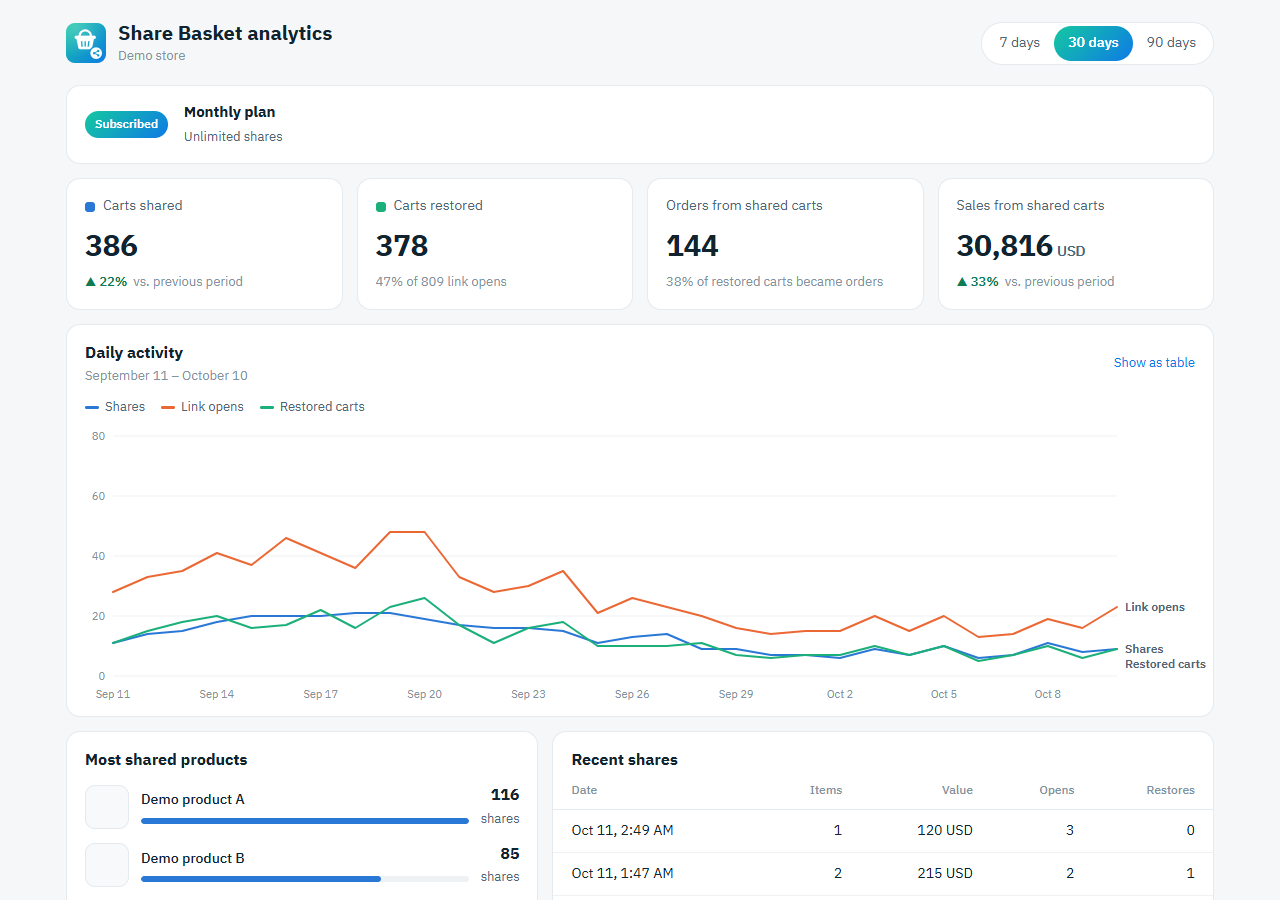
Shares, restored carts, and the orders and revenue that came from shared carts, as they happen.
No customer personal data is collected. Links contain products only.
The button and screens follow each visitor’s language, with full right-to-left support.
A small script that loads after your page, so your store stays fast.
A simple dashboard inside your store admin: shares, link opens, restored carts, and the real orders and revenue they bring in, plus your most shared products.
Install from your platform’s app store. Billing goes through your platform invoice.
WooCommerce, Magento, a custom store or something else. Tell us about your store and we’ll get in touch.
Some abandoned carts are just waiting on someone else. Ways to reduce cart abandonment on Shopify, from clear costs to letting shoppers share their cart.
Read articleA guide to WhatsApp shopping for Shopify stores. Let customers send their whole cart in one link, with a product preview, so the recipient can check out.
Read articleA shareable cart link turns a full Shopify cart into one short URL anyone can open. Learn how cart sharing works and why your store needs it for social sales.
Read articleShopify: $9.99/month or $99/year, with a 30-day free trial. Salla and Zid: $10.40/month or $99.73/year, with a 14-day free trial. You subscribe through your platform’s app store and can cancel anytime.
No. The button appears after you install. On Shopify you switch it on once in the theme editor with one click.
Yes. In the app you choose: inside the cart above checkout, a floating button, or automatic (both). You also pick the floating side and the color.
Links store products and quantities only. Prices come from your store when the link is opened, so recipients always see current prices.
Only available items are added, and the recipient sees how many items were unavailable.
Only the products in a shared cart (id, quantity, options, name and image for the preview) and how many times the link was opened. No customer names, phone numbers or addresses.
Send us your platform and store URL from the contact page and we’ll get back to you about connecting it.
Install Share Basket on your store in a minute.
Install the app